| .github | ||
| ci | ||
| cmd | ||
| d2ast | ||
| d2chaos | ||
| d2compiler | ||
| d2exporter | ||
| d2format | ||
| d2graph | ||
| d2layouts | ||
| d2oracle | ||
| d2parser | ||
| d2plugin | ||
| d2renderers | ||
| d2target | ||
| d2themes | ||
| docs | ||
| e2etests | ||
| lib | ||
| testdata | ||
| .gitattributes | ||
| .gitignore | ||
| .gitmodules | ||
| c.go | ||
| d2.go | ||
| go.mod | ||
| go.sum | ||
| install.sh | ||
| LICENSE.txt | ||
| make.sh | ||
| Makefile | ||
| README.md | ||







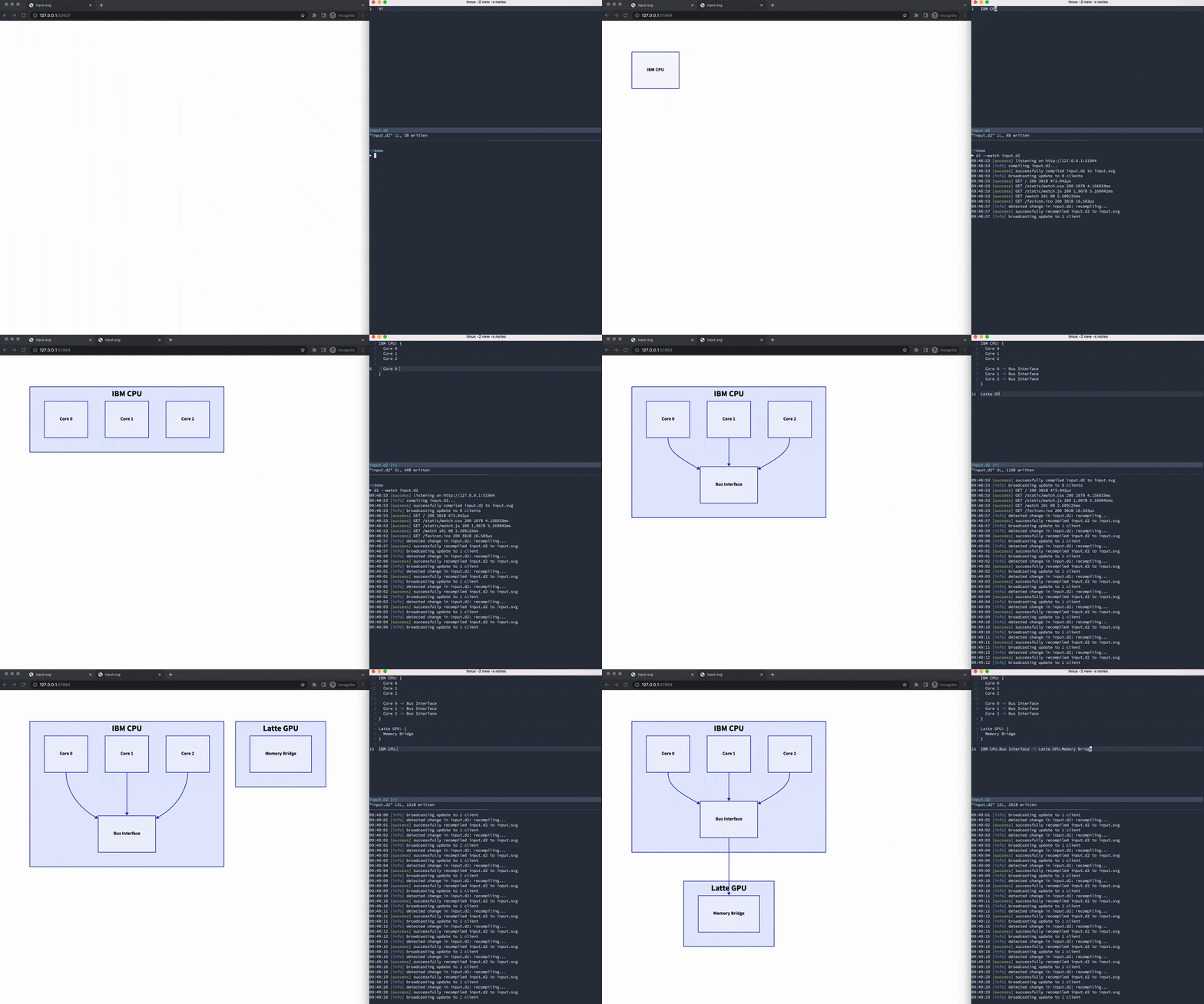
Table of Contents
- Quickstart
- Install
- D2 as a library
- Themes
- Fonts
- Export file types
- Language tooling
- Plugins
- Comparison
- Contributing
- License
- Related
- FAQ
Quickstart
The most convenient way to use D2 is to just run it as a CLI executable to
produce SVGs from .d2 files.
# First, install D2
curl -fsSL https://d2lang.com/install.sh | sh -s --

echo 'x -> y -> z' > in.d2
d2 --watch in.d2 out.svg
A browser window will open with out.svg and live-reload on changes to in.d2.
Install
Install script
The recommended way to install is to run our install script, which will figure out the best way to install based on your machine. E.g. if D2 is available through a package manager installed, it will use that package manager.
# With --dryrun the install script will print the commands it will use
# to install without actually installing so you know what it's going to do.
curl -fsSL https://d2lang.com/install.sh | sh -s -- --dryrun
# If things look good, install for real.
curl -fsSL https://d2lang.com/install.sh | sh -s --
We have precompiled binaries on the releases page for macOS and Linux. For both amd64 and arm64. We will release package manager distributions like .rpm, .deb soon. We also want to get D2 on Homebrew for macOS and release a docker image.
To uninstall:
curl -fsSL https://d2lang.com/install.sh | sh -s -- --uninstall --dryrun
# If things look good, uninstall for real.
curl -fsSL https://d2lang.com/install.sh | sh -s -- --uninstall
warn: Our binary releases aren't fully portable like normal Go binaries due to the C dependency on v8go for executing dagre.
Install from source
Alternatively, you can install from source:
go install oss.terrastruct.com/d2
D2 as a library
In addition to being a runnable CLI tool, D2 can also be used to produce diagrams from Go programs.
import (
  "github.com/terrastruct/d2/d2compiler"
  "github.com/terrastruct/d2/d2exporter"
  "github.com/terrastruct/d2/d2layouts/d2dagrelayout"
  "github.com/terrastruct/d2/d2renderers/textmeasure"
  "github.com/terrastruct/d2/d2themes/d2themescatalog"
)

func main() {
  graph, err := d2compiler.Compile("", strings.NewReader("x -> y"), &d2compiler.CompileOptions{ UTF16: true })
  ruler, err := textmeasure.NewRuler()
  err = graph.SetDimensions(nil, ruler)
  err = d2dagrelayout.Layout(ctx, graph)
  diagram, err := d2exporter.Export(ctx, graph, d2themescatalog.NeutralDefault)
  ioutil.WriteFile(filepath.Join("out.svg"), d2svg.Render(*diagram), 0600)
}
D2 is built to be hackable -- the language has an API built on top of it to make edits programmatically.
import (
  "github.com/terrastruct/d2/d2oracle"
  "github.com/terrastruct/d2/d2format"
)

// ...modifying the diagram `x -> y` from above
// Create a shape with the ID, "meow"
graph, err = d2oracle.Create(graph, "meow")
// Style the shape green
graph, err = d2oracle.Set(graph, "meow.style.fill", "green")
// Create a shape with the ID, "cat"
graph, err = d2oracle.Create(graph, "cat")
// Move the shape "meow" inside the container "cat"
graph, err = d2oracle.Move(graph, "meow", "cat.meow")
// Prints formatted D2 code
println(d2format.Format(graph.AST))
This makes it easy to build functionality on top of D2. Terrastruct uses the above API to implement editing of D2 from mouse actions in a visual interface.
Themes
D2 includes a variety of official themes to style your diagrams beautifully right out of the box. See ./d2themes to browse the available themes and make or contribute your own creation.
Fonts
D2 ships with "Source Sans Pro" as the font in renders. If you wish to use a different one, please see ./d2renderers/d2fonts.
Export file types
D2 currently supports SVG exports. More coming soon.
Language tooling
D2 is designed with language tooling in mind. D2's parser can parse multiple errors from a broken program, has an autoformatter, syntax highlighting, and we have plans for LSP's and more. Good language tooling is necessary for creating and maintaining large diagrams.
The extensions for VSCode and Vim can be found in the Related section.
Plugins
D2 is designed to be extensible and composable. The plugin system allows you to change out layout engines and customize the rendering pipeline. Plugins can either be bundled with the build or separately installed as a standalone binary.
Layout engines:
- dagre (default, bundled): A fast, directed graph layout engine that produces layered/hierarchical layouts. Based on Graphviz's DOT algorithm.
- ELK (bundled): A directed graph layout engine particularly suited for node-link diagrams with an inherent direction and ports.
- TALA (binary): Novel layout engine designed specifically for software architecture diagrams. Requires separate install, visit the Github page for more.
D2 intends to integrate with a variety of layout engines, e.g. dot, as well as
single-purpose layout types like sequence diagrams. You can choose whichever layout engine
you like and works best for the diagram you're making.
Comparison
For a comparison against other popular text-to-diagram tools, see https://text-to-diagram.com.
Contributing
Contributions are welcome! See ./docs/CONTRIBUTING.md.
License
Copyright © 2022 Terrastruct, Inc. Open-source licensed under the Mozilla Public License 2.0.
Related
VSCode extension
https://github.com/terrastruct/d2-vscode
Vim extension
https://github.com/terrastruct/d2-vim
Language docs
https://github.com/terrastruct/d2-docs
Misc
FAQ
- Does D2 collect telemetry?
- No, D2 does not use an internet connection after installation, except to check for version updates from Github periodically.
- Does D2 need a browser to run?
- No, D2 can run entirely server-side.
- I have a question or need help.
- The best way to get help is to ask on D2 Discord
- I have a feature request, proposal, or bug report.
- Please open up a Github Issue.
- I have a private inquiry.
- Please reach out at hi@d2lang.com.